Roburbia Character Studio Guide
First-load avatar setup, readable street looks, and Playground clothing bags.
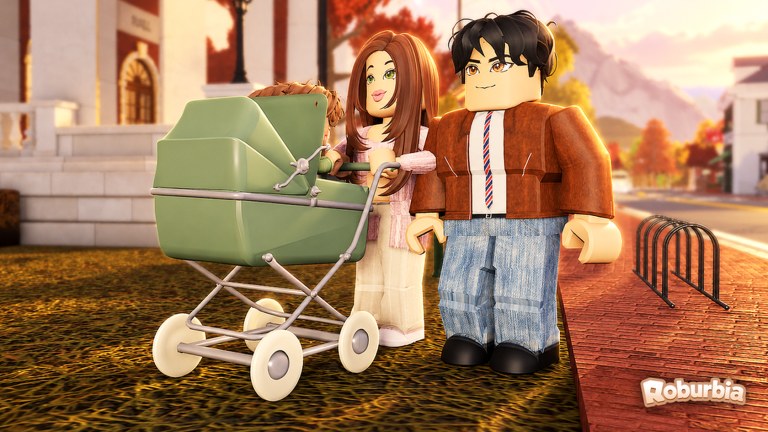
Character Studio is the first screen most players meet in Roburbia, Lúmen Studio’s free Roblox life sim. Open beta began on 19 October 2026. The experience lives under universe 10323282681 with soft eight-player servers. This guide covers what to customize on first load—hair, face, clothes, and colors—how to stay readable on busy streets, how to think about work versus home looks, how families match outfits for roleplay, and how clothing bags from the Playground Update let you change later. Pair it with Getting Started for the rest of hour one and the Wiki overview if you still need the big map.
Roburbia is free to play. Optional gamepasses speed jobs or deepen build tools, but none are required for Character Studio. Skip the Robux store until you enjoy the free loop; when you do browse prices, use the Gamepasses Tier List instead of impulse buys.
What Character Studio is (and is not)
Character Studio is a look editor, not a hidden progression sheet. You pick a silhouette you can spot from across Main Street or the pier. There is no confirmed genetics meter, romance affinity bar, or secret “attractiveness” score that Studio choices unlock. Players may freestyle family or romance roleplay later, but Studio itself only sets appearance. Do not hunt for undocumented DNA menus—if Lúmen Studio has not shipped them, this wiki will not invent them.
Finish Studio, spawn, walk your starter home, then open the Phone as described on Controls. Looks do not replace Careers, Codes, or daycare planning.
First-load checklist: hair, face, clothes, colors
Work the panels in a calm order so you do not rush Confirm with a look you cannot recognize later:
- Hair — Choose a shape and color with clear edges. Soft pastels that blend into autumn town lighting can disappear on mobile.
- Face — Pick brows, eyes, and mouth pieces you can still read at mid-distance. Extreme micro details vanish when eight avatars crowd a market aisle.
- Clothes — Start with a simple top/bottom (or onesie-style set) that contrasts your skin and hair. Save layered “fashion week” fits for clothing bags after you know the street palette.
- Colors — Lock a two- or three-color palette (for example warm terracotta + cream, or navy + white). Matching accents make group photos and stroller walks easier to stage.
Confirm only when the full-body preview still reads after you squint. That squint test mimics phone screens and crowded HUDs.
Readable looks on eight-player streets
Roburbia’s social design is the eight-player cap: every florist line, cart, and double stroller is personal. A muddy brown-on-brown fit that looked fine in Studio can vanish next to autumn foliage and cozy street props. Prefer:
- One high-contrast hair or jacket color
- Distinct silhouette (hat, coat, or bag shape) over tiny face stickers alone
- Avoid all-black or all-beige if your device brightness is low
Mobile players especially benefit from bold blocks of color. If friends cannot find you at the pier playground, reopen outfit tools later instead of blaming the map.
Work looks vs home looks
You do not need two locked “jobs” in Studio, but planning two vibes helps roleplay without spending Robux:
- Work — Clean apron-adjacent colors, short hair or tied styles, shoes that look ready for florist, market mop, diner, or delivery loops from Getting Started.
- Home — Softer lounge fits for kitchen cooking, TV time, nursery carry, and Home Building sessions.
Switching between those vibes is exactly what Playground clothing bags and clothing-store shopping support after the late-November update. Keep a “daily driver” fit for jobs so you are not re-shopping every Careers teleport.
Family matching without fake genetics
Households that adopt at Town Hall often want matching sweaters, sibling color themes, or parent–child accents for pier photos. Treat matching as optional costume language, not a breeding simulator. Studio does not publish inheritance rules for baby faces. When you raise kids, care meters and daycare costs matter more than coordinated beanies—read Babies before you open Town Hall’s first door on the right.
If your group wants a shared palette, agree on one accent color in chat, then each person applies it with clothing bags. That scales better than restarting characters.
Changing later with Playground clothing bags
As of 25 November 2026, the live headline is the Playground Update: pier playground gear, strollers, playpens, nannies, cozy streets, cooking minigames, and clothing bags that extend the errand fantasy already taught by grocery paper bags. Use clothing bags when:
- Your first-load fit fails the street readability test
- You want a work uniform separate from a home lounge set
- Your household plans a matching outing
Clothing bags do not require a Character Studio pass. Optional build cosmetics such as DECALS (149 Robux) decorate homes, not your face—see Decals and Home Building when wall art is the goal instead of wardrobe.
Passes, money, and what Studio never gates
Character Studio is available on the free path. STAR EMPLOYEE, ARCHITECT, ADVANCED PLACING, BUILD SLOTS, DECALS, HAPPY BABY, and other store items sit between 99 and 299 Robux and never unlock the first-load editor. Rank spend value on the Gamepasses Tier List after you have coins from real shifts—not before you pick a hairstyle.
Mid-article trailer note
Watch the official trailer mid-page to see Character Studio energy, street crowds, and the cozy avatar tone Lúmen Studio markets for Roburbia. Use it as a vibe check, not as a hidden feature list.
Practical session flow after Confirm
- Spawn and walk home + Main Street once.
- Open Phone → Careers and Codes (Controls).
- Run one short job before adopting or buying cars.
- If your silhouette disappears in crowds, plan a clothing-bag refresh after you bank a small float.
- Skim Guides Hub for money, babies, build, and vehicle deep dives.
Mistakes to avoid
- Confirming a low-contrast fit you cannot spot on mobile.
- Restarting the experience repeatedly hunting for fake genetics or romance meters.
- Spending Robux on passes because Studio felt “incomplete”—it is not a paywall.
- Matching family outfits before you can afford daycare (~30 coins per child per day when you clock in).
- Confusing home decals with avatar clothing; walls and wardrobes are different systems.
Related reading
- Getting Started — first-hour route after Studio
- Controls — Phone and interact keys
- Home Building — catalog and build passes
- Babies — adoption and family tools
- Decals — wall cosmetics vs wardrobe
- Playground Update — clothing bags and cozy streets
- Gamepasses Tier List — optional Robux value
- Guides Hub — all how-tos
- Wiki — facts overview
Pick a readable palette, Confirm with confidence, and let clothing bags handle fashion experiments after your first florist or market shift. Roburbia’s Character Studio is a front door, not a meta spreadsheet.
Frequently Asked Questions
Quick answers to the most common Roburbia questions.
When do I see Character Studio in Roburbia?
On first load into Lúmen Studio’s Roburbia (open beta since 19 October 2026, universe 10323282681). Finish hair, face, clothes, and colors before you spawn into town.
Can I change my look after Character Studio?
Yes. After the Playground Update you can refresh outfits with clothing bags and clothing-store shopping. You do not need to delete your character for a new sweater.
Do I need a gamepass to use Character Studio?
No. Roburbia is free to play and Character Studio is on the free path. Optional passes help jobs or building later; none gate the first-load editor.
Does Character Studio control genetics or romance meters?
No confirmed genetics, romance, or attractiveness meters are tied to Studio choices. Treat it as appearance only; do not invent hidden DNA systems.
What makes a good look for eight-player servers?
High-contrast hair or jacket colors, a clear silhouette, and a simple palette you can spot on mobile when the street or pier is full.
Are clothing bags the same as the DECALS pass?
No. Clothing bags change avatar outfits from Playground-era shopping. DECALS (149 Robux) is an optional home cosmetic pass—see the Decals and Home Building guides.